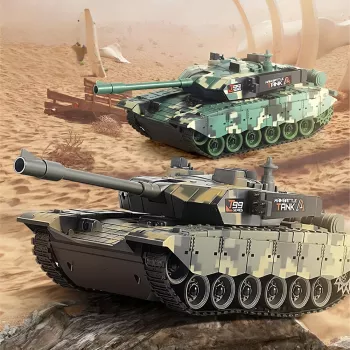
2.4GHz RC Battle Tank: Sounds, Lights & 360° Turret

2.4GHz RC Battle Tank Toy with Sound, Lights & 360° Rotating Turret: What to Expect and How to Play
A remote-control battle tank is at its best when it feels responsive, looks dramatic in motion, and stays easy to run for kids and families. This guide breaks down the features that matter—2.4GHz control, sound and light effects, and a fully rotating turret—plus simple play ideas, safety notes, and what to check before buying.
Quick look at the features that change the experience
At a glance, many RC vehicles look similar. In real play, a few specific features determine whether it feels “toy-like” or genuinely immersive.
- 2.4GHz control helps reduce interference when multiple RC toys are used nearby, making group play smoother.
- Sound effects add pretend-play energy; volume considerations matter for indoor use and younger children.
- Lights improve visibility and add excitement for evening play or dim rooms.
- 360° rotating turret makes aiming and pretend battle scenarios more dynamic without needing to reposition the whole tank.
- Tracked movement typically handles rugs, playmats, and small bumps better than simple wheels (surface still matters).
Feature checklist for play and practicality
| Feature | Why it matters | What to look for during setup |
|---|---|---|
| 2.4GHz radio control | More reliable control around other devices and other RC toys | Stable pairing, responsive steering, minimal dropouts |
| Sound effects | Adds immersion and role-play fun | Clear sound, easy on/off control if available |
| Lights | Visual excitement and better visibility | Even lighting, noticeable but not distracting indoors |
| 360° rotating turret | More realistic aiming and action play | Smooth rotation, consistent response to controller input |
| Tracked drive | Better traction on varied surfaces | Tracks seated properly, no skipping or slipping on turns |
How 2.4GHz control helps during real play
Older toy RC frequencies can get “crowded” quickly, especially in apartments, playrooms, or when siblings want to run multiple vehicles at once. A 2.4GHz system is designed to make shared spaces easier.
- Supports simultaneous play: multiple RC toys can often be used in the same room without constantly fighting for signal.
- More consistent response: fewer random stops or steering glitches compared with older-frequency toy controllers.
- Better for group settings: birthday parties, sibling play, and indoor/outdoor transitions.
- Placement tip: for best range, minimize large metal objects and dense walls between the controller and the toy.
For a deeper look at how RF devices are managed in the U.S., the Federal Communications Commission provides a clear overview of radio frequency devices and compliance basics.
Turret rotation, lights, and sound: turning driving into missions
The big difference between “driving around” and “playing a game” is usually the turret. A 360° rotating turret lets the tank stay in position while the action continues—more like a mini mission than a lap around the couch.
- “Cover fire” play: park behind a barricade while the turret scans and “targets.”
- Light-based signals: use lights as a rule system (start/stop, base captured, night patrol).
- Sound rules: keep sound on during battles, off during stealth rounds to make the switch feel meaningful.
- Indoor-friendly setup: use pillows or foam blocks as checkpoints; avoid fragile décor and keep a clear path.
Try a simple 10-minute mission loop to keep the pace fun: (1) drive to three “supply points,” (2) rotate turret to “scan” each point for five seconds, (3) return to base without touching any cones (paper cups work well).
Battery and charging basics (so playtime stays predictable)
Most frustrations with RC toys come from power management rather than the toy itself. A few habits can make performance feel consistent from session to session.
- Charge before first use so the initial session reflects normal runtime and responsiveness.
- Expect gradual slowdown as the battery gets low: weaker drive, slower turns, and dimmer lights are common signs.
- Cool-down helps: when possible, let the battery cool after play before charging again.
- Storage matters: store the tank and controller in a dry place; remove controller batteries if it will sit unused for an extended time.
Where it plays best: surfaces, obstacles, and simple maintenance
Tracked vehicles usually handle transitions better than basic wheels, but any RC tank will feel different depending on the surface. A little prep also prevents common “why is it turning weird?” issues.
Gift and age-fit notes for families
For general toy safety guidance and age-appropriateness reminders, the U.S. Consumer Product Safety Commission maintains a helpful hub on toy safety.
Popular picks available now
- 2.4GHz RC Battle Tank Toy with Sound, Lights & 360° Rotating Turret ($58.67)
- Safe Steps: Your Step-by-Step Guide to Babyproofing Every Corner ($10.99)
- Tender Minds, Strong Hearts: Supporting Your Highly Sensitive Child ($6.99)
FAQ
Can multiple RC tanks run at the same time without interfering with each other?
Often, yes—2.4GHz systems are designed to reduce interference and support multiple devices in the same area. Pairing behavior varies by model, so it helps to power on and pair one tank at a time before turning on the next.
Does the turret rotate while the tank is moving?
Yes, turret rotation is typically built for action play and can be used while driving for more dynamic “missions.” For the smoothest response, start with a full charge, since low battery power can reduce turret speed and driving strength.
Is this RC tank suitable for indoor play?
Yes, with a cleared path and soft obstacles like pillows, foam blocks, or cups as cones. Keep sound volume in mind and avoid delicate areas; tracked toys can scuff or bump softer surfaces if driven aggressively.









Leave a comment